 Declutta
Best iPhone Cleaner App? Read This Before You Install One
Most iPhone cleaner apps advertise things iOS does not allow. What a cleaner can really do, eight red flags, and how to judge one first.
Search for an iPhone cleaner and you’ll find a hundred apps promising to remove junk files, clear caches, boost memory and speed up your phone.
Almost none of that is possible on an iPhone - not because the apps are badly built, but because iOS does not permit it. Knowing what the OS allows turns a confusing list of near-identical apps into a short, decidable one.
We make a cleaner ourselves. It’s named at the end, after the criteria, so you can judge the criteria first.
What no iPhone cleaner app can do
Every app on iOS runs in a sandbox: a sealed container it cannot see outside of. The same design that stops a flashlight app reading your banking session. No exceptions for cleaners.
| Common claim | Reality |
|---|---|
| “Clears app caches” | Impossible - each cache is inside its own sandbox |
| “Removes junk files” | There is no accessible junk-file area on iOS |
| “Cleans System Data / Other” | Not reachable by any third-party app |
| “Boosts RAM / frees memory” | iOS manages memory itself |
| “Speeds up your iPhone” | Nothing an app can reach affects system speed |
| “Finds duplicate/similar photos” | Possible, with Photos permission - this one is real |
A listing leading with any of the first five is describing something iOS forbids - which tells you what you need about the rest of it. The genuine ways to clear caches and System Data are in Settings, and free: cache · System Data.
What a cleaner can legitimately do
One thing - and fortunately it is the thing that matters. With your permission, an app can read your photo and video library, which on most iPhones is 60-80% of all used space, far more than every cache, log and system file combined.
It is a real gap, because the Photos app cannot:
- Recognise that four shots are near-identical and keep the best one
- Tell you which video is 2 GB and which is 20 MB
- Separate screen recordings from footage you’d actually miss
- Find the shots that came out blurry or black
- Strip the paired video off a Live Photo
- Re-encode a large video to a smaller one in place
That is the honest case for installing anything at all. Everything else a cleaner advertises, you can do yourself in Settings in ten minutes.
Eight things to check before installing
- Does it process everything on the device? Check the App Store privacy label - “Data Not Collected” is what you want. Photos or usage data linked to you means a server is involved.
- Does it need an account? A cleaner has no legitimate reason to want your email address.
- Can you see the full scan result before paying? The standard dark pattern: a dramatic “34.7 GB found”, delete button behind a paywall. Every number should be visible first.
- Check the in-app purchase list on the store page. A $9.99/week subscription is disclosed there before you install. Look.
- Does anything delete without confirmation? A one-tap Clean All is bad design for an irreversible operation.
- Does it respect Recently Deleted? Removed photos should land in the system album, where iOS holds them about 30 days.
- Does compression preserve metadata? Or your whole library’s dates jump to today.
- Are its claims even possible? An app willing to advertise RAM boosting is willing to tell you other things that aren’t true.
Red flags
- A fake scan animation that takes the same time regardless of library size
- “1,247 junk files detected” - there is no such category on iOS
- A subscription prompt on first launch, before it has shown you anything
- Scare framing: red warnings, “critical”, “your iPhone is at risk”
- Reviews mentioning surprise charges - filter to Most Recent and 1-star, read ten
- Permissions it can’t need - contacts, location or microphone for a storage cleaner
What we make
Disclosure, since this is our site: Declutta is ours. Judge it against the eight criteria above rather than against our description of it.
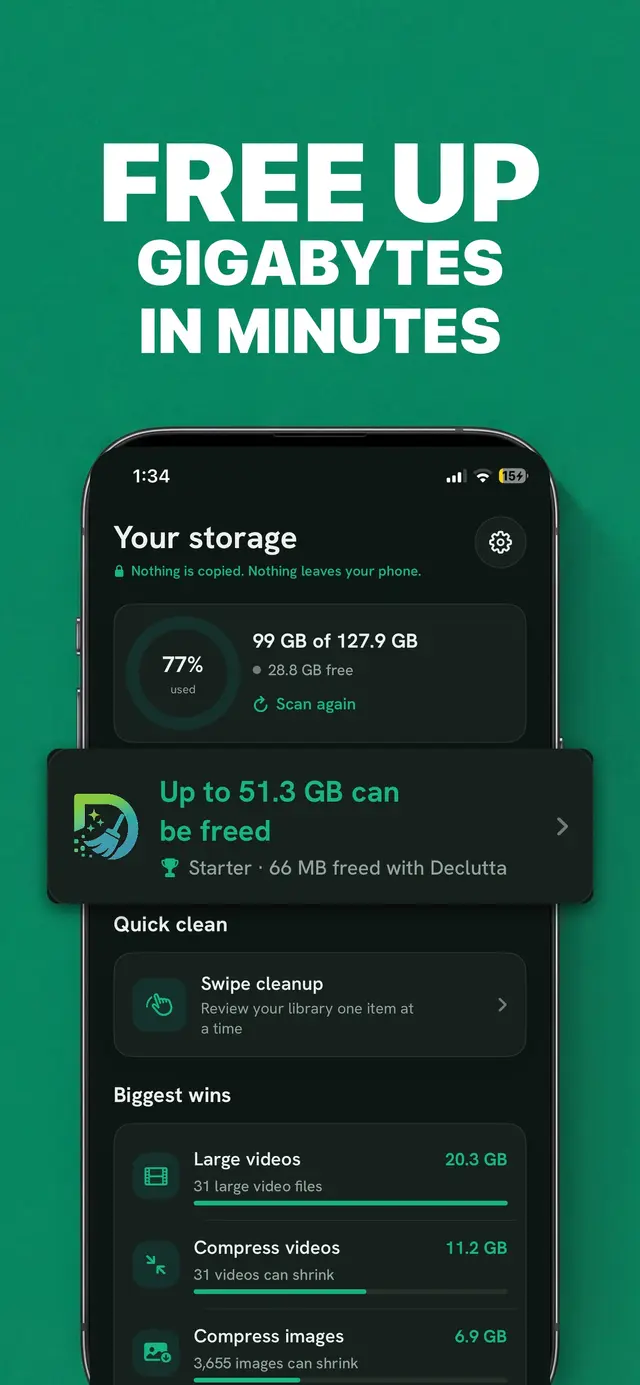
It does the one thing in the legitimately-possible section and claims nothing else: duplicates and near-identical shots, videos sorted by size, screen recordings on their own screen, blurry and dark photos shortlisted, one frame kept per burst, Live Photos converted to stills, and compression that preserves date, location and EXIF.
Against the checklist: it runs on the device, needs no account, works offline, collects no analytics, deletes nothing until you confirm, and sends deletions to Recently Deleted. Free - no ads, no paywall, every screen available to everyone. What it cannot do is clear caches, shrink System Data or speed up your phone, because no iPhone app can.
Frequently asked questions
Do iPhone cleaner apps actually work?
The ones that clean your photo and video library work, because that is something iOS permits an app to do with your permission. The ones advertising junk file removal, cache clearing, RAM boosting or speed improvements do not work, because iOS does not allow any app to do those things.
Are iPhone cleaner apps safe?
A cleaner that works entirely on-device and never uploads is safe. The risk is not malware, it is privacy and billing: some cleaners upload photo data to their own servers for processing, and many use aggressive subscription funnels that charge weekly after a short trial. Check the App Store privacy label and the in-app purchase list before installing.
Is there a free iPhone cleaner app with no subscription?
Yes, though they are rare - most cleaners show you a scan result and then charge before letting you delete anything. Declutta, which we make, is free with no ads, no paywall and no account. Whatever you pick, check the app’s in-app purchase list on its App Store page before installing.
Check it against the list above. Declutta shows how much is recoverable before you delete anything - free, no ads, no paywall, nothing uploaded.
Get Declutta freeIf you’d rather do it by hand first, the full method is in how to free up storage on iPhone.